Analysis symbology
After running an analysis, Siter displays QD arcs, dimensions, and violation indicators on the map. Use the Analysis Symbols sidebar to toggle each symbol type on or off and to customize the line, fill, and label styling for any criteria type code (IBD, PTRD, IMD, etc.).
Prerequisites
- You must have run an analysis on the project (see Running an analysis)
- You must have the Project Edit Permission or higher to change or save symbol styling
How to open the Analysis Symbols sidebar
-
Click the menu icon on the left sidebar header to open the sidebar chooser
-
Select Analysis Symbols
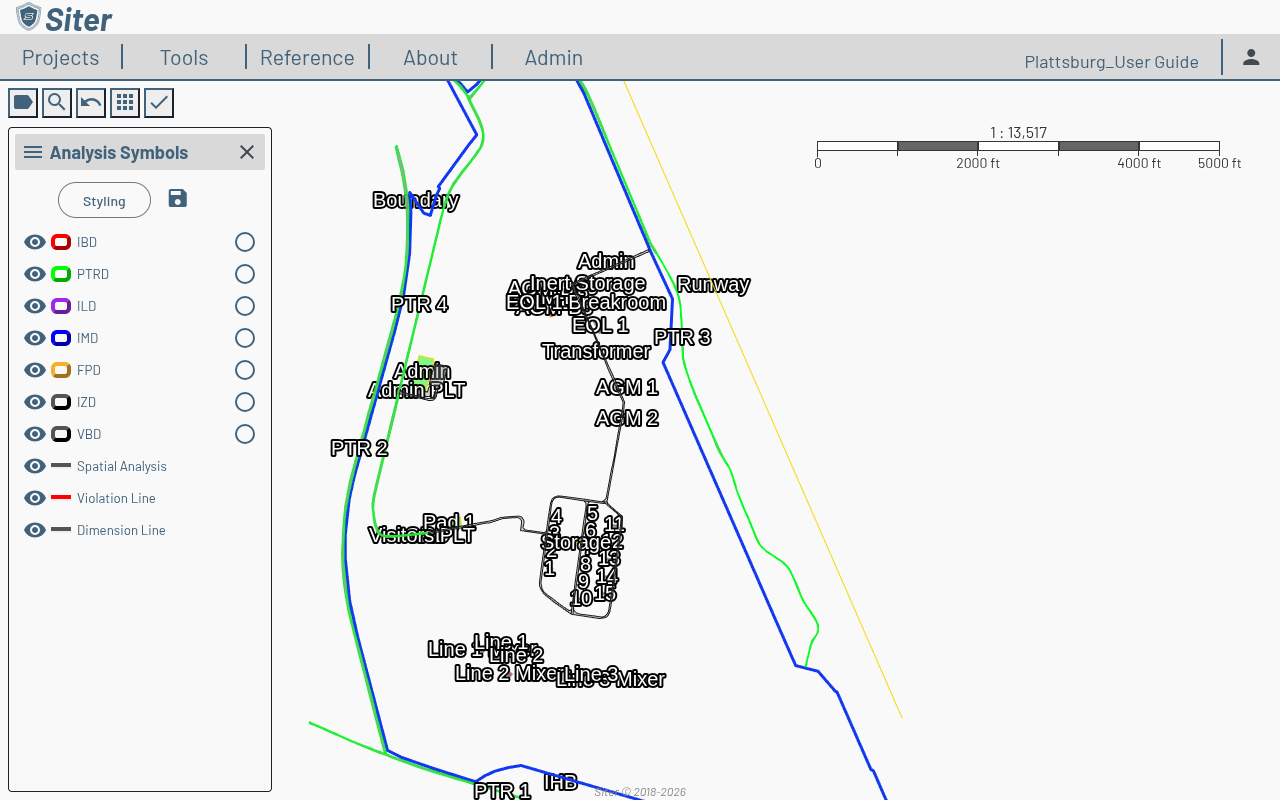
The sidebar lists every criteria type code present in the analysis results, plus rows for Spatial Analysis, Violation Line, and Dimension Line. Each row has:
- An eye toggle to show or hide that symbol on the map
- A color swatch and line preview — click it (or the row name) to open that row's styling editor
- On arc rows only, a union toggle that merges overlapping arcs of the same style into one region
The sidebar header has a Styling menu for switching to one of Siter's default palettes or to your own saved style (see How to reset to defaults and How to use My Custom Style) and a save (floppy disk) icon that persists your changes.
How to toggle a symbol on or off
- Open the Analysis Symbols sidebar
- Click the eye icon next to the symbol row
- The symbol shows or hides on the map immediately — no save required
How to customize a symbol's styling
- Click the symbol row's color swatch or name — its styling editor expands beneath the row
- Adjust the editor fields — the map updates as you change them
- Click the save (floppy disk) icon in the sidebar header to persist changes
- Click the swatch or name again to collapse the editor
The available fields depend on the symbol type. Arc symbols expose line and fill controls; violation and spatial analysis lines expose line color and width; dimension lines expose a Line editor and a Text editor (see below).
How to style dimension line labels
Dimension line labels use the same text controls as feature labels, so you can match the two.
-
In the Analysis Symbols sidebar, click the Dimension Line swatch or name
-
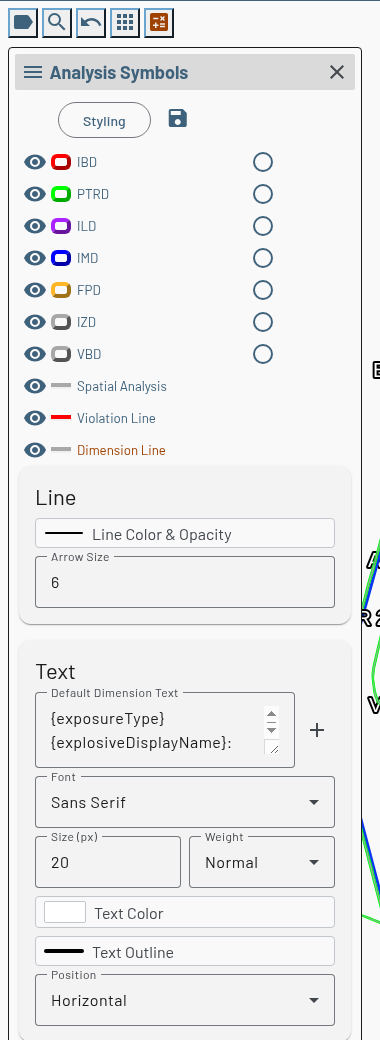
Two cards expand beneath the row — Line and Text:
-
In the Line card, set Line Color & Opacity (color and line width) and Arrow Size (0–10)
-
In the Text card, set:
- Default Dimension Text — the label template used by every dimension that has no custom text of its own. Click the + (Insert variable) button to add a variable such as the result value or units
- Font — the typeface: Sans Serif, Serif, Monospace, Arial, Georgia, Courier New, Trebuchet MS, or Verdana
- Size (px) — text size, 8–72. Values outside the range are adjusted to the nearest limit; a blank or invalid entry resets to 20
- Weight — Normal or Bold
- Text Color — the fill color of the text
- Text Outline — the halo color drawn around the text for contrast, and its Line Width
- Position — Inline draws the label along the dimension line; Horizontal draws it level beside the line's end point
-
Click the save (floppy disk) icon in the sidebar header
How to reset to defaults
- Open the Analysis Symbols sidebar
- Click Styling in the sidebar header
- Select a default palette:
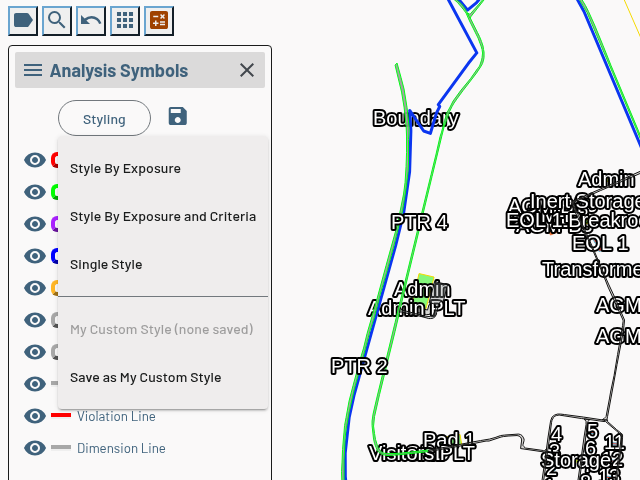
- Style By Exposure — one style per exposure type (IBD, PTRD, ILD, IMD, and so on)
- Style By Exposure and Criteria — a separate style for each exposure type on each criteria set
- Single Style — every arc in one style
- Click the save (floppy disk) icon to keep the new palette
Choosing a palette replaces all current overrides with Siter's built-in styling for every symbol type.
How to use My Custom Style
My Custom Style is your own saved set of analysis symbols. It is stored with your account rather than with a project, and every project you create starts with it. The Styling menu has two entries for it, below the palettes:
Save the current symbols as your custom style
- Style the project's symbols the way you want them
- Click Styling in the sidebar header
- Select Save as My Custom Style. Siter confirms with Saved. Manage it in Preferences.
Once a custom style is saved, the menu item reads Update My Custom Style; selecting it asks you to confirm before replacing your saved symbols. Projects you have already created keep the symbols they were made with.
Apply your custom style to this project
- Click Styling in the sidebar header
- Select My Custom Style — the map previews your saved symbols
- Click the save (floppy disk) icon to keep them for this project
The item reads My Custom Style (none saved) and is disabled until you save one. If your custom style was saved against criteria this project does not use, Siter tells you that none of it applies.
To edit your custom style without opening a project — or to start from Style By Exposure and Criteria across every criteria Siter knows about — use the Analysis Symbols card on the Preferences tab.
Related topics
- Running an analysis — executing and viewing analysis results
- Feature labels — the matching text controls for facility labels
- Drawings — exporting the styled map view to a drawing output
- Preferences — edit My Custom Style and other new-project defaults