Digitizer
The Digitizer is a drawing-assist sidebar that helps you capture facility geometry precisely. It controls what your cursor snaps to and lets you lock the angle and length of segments as you draw or edit a feature's shape.
Prerequisites
- You must have an open project
How to open the Digitizer
-
With a project open, click the menu icon in the left sidebar header to open the sidebar chooser
-
Select Digitizer
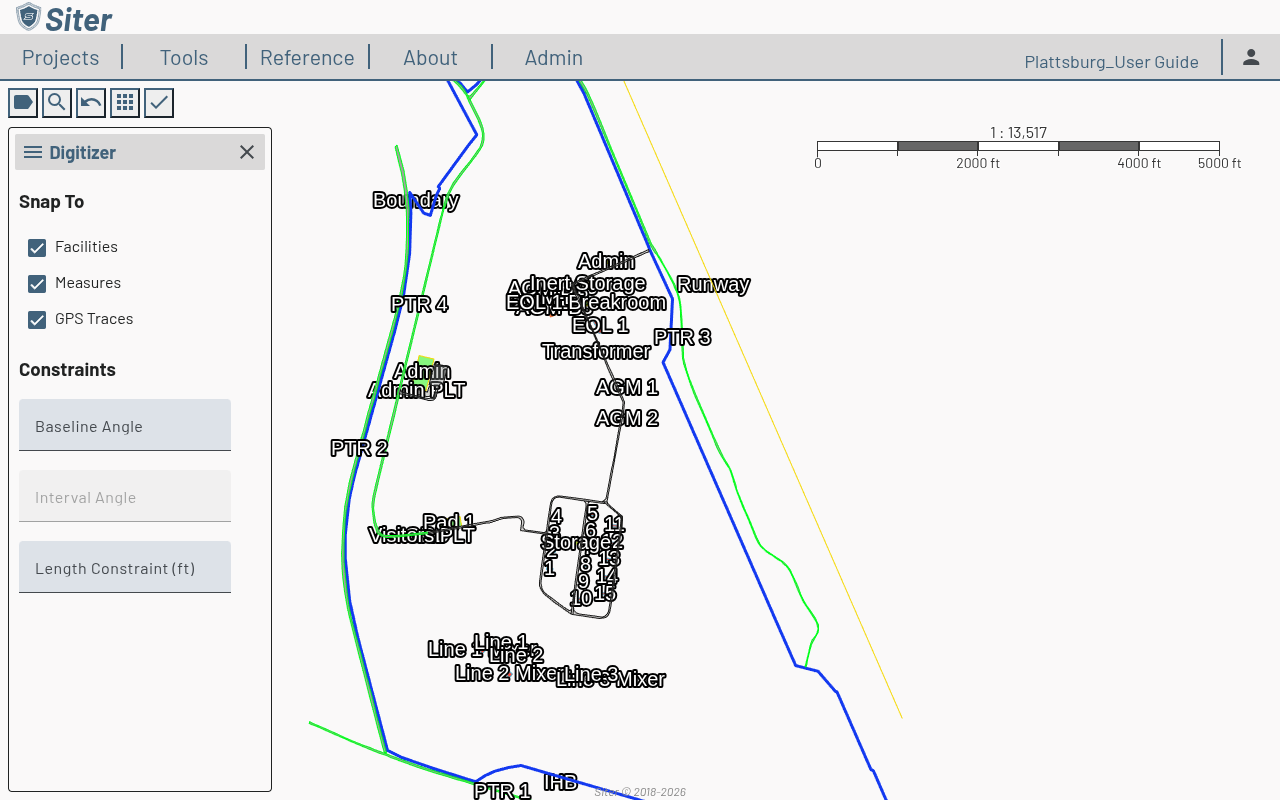
Snap To
The Snap To section controls what the cursor latches onto while you draw. Each target has its own checkbox (all on by default):
- Facilities — snap to existing facility geometry
- Measures — snap to markup measurements (distances, areas, buffers)
- GPS Traces — snap to imported GPS trace geometry
Uncheck a target to place a vertex free of that reference.
How close the cursor has to be before it snaps is set by Snap Tolerance on the Map Behavior card of your Preferences — 4 to 40 screen pixels, 12 by default. Raise it if snapping is hard to trigger, or lower it if the cursor jumps to nearby geometry you did not mean to snap to. The setting follows you to every project and takes effect as soon as you save it.
Constraints
The Constraints section locks the angle and length of the segment you're drawing:
- Baseline Angle — set a reference angle for the segment
- Interval Angle — constrain turns to a repeating angle increment (available once a baseline angle is set)
- Length Constraint — lock the segment to a fixed length. The label shows the unit — (ft) or (m) — set by Working Units on your Preferences
Leave a field blank to leave that property unconstrained.
Related topics
- Features — add and manage features on the map
- Feature shapes — other methods for defining feature geometry
- Measurements — the Markup sidebar for distances, areas, and buffers
- Preferences — Snap Tolerance and Working Units